

| Hitachi Data Systems Hitachi, Ltd. | |
|
|
|
Log filesWhen you click on the Log page in Hi-Track RACC, the log page will display the log for the current day. If JavaScript is enabled in the web browser you are using, the log display will be dynamic. As the RACC service appends lines to the log file, the log page will be updated to display the new lines written to the log.
When you view a log from a day other than the current day, the dynamically updating behavior is off by default because no new entries will be written to a log file other than that of the current day. While viewing the current day's log, you may want to scroll the log window upward to view log entries that are not in the visible area of the window. If you grab the scrollbar and slide it upward to scroll up, it will snap back down to the bottom of the log file unless you turn off the dynamically updating behavior. 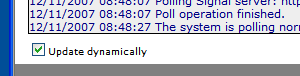
In the lower left-hand corner of the page is a checkbox you can use to control the dynamic updates behavior. Uncheck this checkbox to turn off this behavior and you will be able to scroll up in the log window.1 Note that while the Update dynamically checkbox is unchecked, no new log lines will be displayed until you turn dynamic updates back on, or reload the page. 1. This behavior depends on JavaScript being enabled in your web browser. If enabling JavaScript in your browser is not an option, you will need to reload the page to see updates to the log file. |
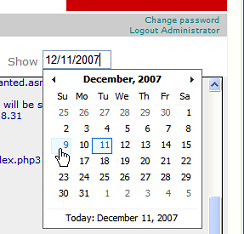 This dynamically updating behavior is the default behavior if you are viewing the
log for the current day. If you click on the edit box in the upper right-hand corner
of the page labeled Show, a calendar will pop up to allow you to
view the log for a different day1.
This dynamically updating behavior is the default behavior if you are viewing the
log for the current day. If you click on the edit box in the upper right-hand corner
of the page labeled Show, a calendar will pop up to allow you to
view the log for a different day1.